<?xml version="1.0" encoding="utf-8"?><feed xmlns="http://www.w3.org/2005/Atom" ><generator uri="https://jekyllrb.com/" version="3.10.0">Jekyll</generator><link href="http://10xdata.pro/feed.xml" rel="self" type="application/atom+xml" /><link href="http://10xdata.pro/" rel="alternate" type="text/html" /><updated>2025-08-22T16:44:36+00:00</updated><id>http://10xdata.pro/feed.xml</id><title type="html">10xdata</title><subtitle>Practical tips and bite size data knowledge</subtitle><entry><title type="html">Lambda vs Kappa architecture</title><link href="http://10xdata.pro/data-architecture/streaming/batch-processing/2025/08/20/lambda-kappa.html" rel="alternate" type="text/html" title="Lambda vs Kappa architecture" /><published>2025-08-20T08:00:00+00:00</published><updated>2025-08-20T08:00:00+00:00</updated><id>http://10xdata.pro/data-architecture/streaming/batch-processing/2025/08/20/lambda-kappa</id><content type="html" xml:base="http://10xdata.pro/data-architecture/streaming/batch-processing/2025/08/20/lambda-kappa.html"><![CDATA[<p>What are the common data processing architectures and what are the pros and cons of each?</p>

<h2 id="lambda-architecture">Lambda Architecture</h2>

<p>Lambda architecture starts with a messaging layer where stream data is queued for processing. Often uses Kafka as a messaging layer.</p>

<p>The data flow is then split into two parallel paths:</p>
<ul>
  <li><strong>Batch layer</strong> - handles data in files or other batch processes</li>
  <li><strong>Streaming layer</strong> (also known as speed layer) - can be consumed instantly with an API</li>
</ul>

<p>Both layers then land in a serving layer (often a data warehouse) where analytics processes can access the data.</p>

<h3 id="lambda-architecture-flow">Lambda Architecture Flow</h3>

<p><strong>Data Processing Steps:</strong></p>
<ol>
  <li><strong>Data Sources</strong> → Kafka/Messaging Layer</li>
  <li><strong>Data Split</strong> → Two parallel paths:
    <ul>
      <li><strong>Batch Layer</strong>: For historical data</li>
      <li><strong>Speed Layer</strong>: For real-time data</li>
    </ul>
  </li>
  <li><strong>Merge Results</strong> → Serving Layer (Data Warehouse)</li>
  <li><strong>Final Output</strong> → Analytics &amp; Queries</li>
</ol>

<h3 id="advantages">Advantages:</h3>
<ul>
  <li>Can use batch processing for reliable, comprehensive data processing</li>
  <li>Can use streaming only when needed for real-time requirements</li>
  <li>Enables fast access when needed but keeps the reliability of batch processing</li>
  <li>Batch process can do thorough validation and cleaning</li>
</ul>

<h3 id="disadvantages">Disadvantages:</h3>
<ul>
  <li><strong>Complexity</strong>: Need to maintain two separate processing pipelines</li>
  <li><strong>Timing challenges</strong>: Data timing is more difficult to manage as some processes run daily and others in real-time</li>
  <li><strong>Data consistency</strong>: Potential for discrepancies between batch and streaming results</li>
</ul>

<h2 id="kappa-architecture">Kappa Architecture</h2>

<p>In Kappa architecture, the message layer coordinates everything. All data gets passed through the speed layer as it’s received and lands directly in a serving layer.</p>

<h3 id="kappa-architecture-flow">Kappa Architecture Flow</h3>

<p><strong>Data Processing Steps:</strong></p>
<ol>
  <li><strong>Data Sources</strong> → Kafka/Messaging Layer</li>
  <li><strong>Single Stream</strong> → Speed Layer (Stream Processing)</li>
  <li><strong>Real-time Processing</strong> → Serving Layer (Data Warehouse)</li>
  <li><strong>Final Output</strong> → Analytics &amp; Queries</li>
</ol>

<p><strong>Historical Data Handling:</strong></p>
<ul>
  <li>Historical Data → Replay from Kafka → Speed Layer</li>
</ul>

<h3 id="advantages-1">Advantages:</h3>
<ul>
  <li><strong>Fast processing</strong>: Everything is handled in real-time</li>
  <li><strong>Simpler architecture</strong>: Fewer components to maintain and debug</li>
  <li><strong>Consistency</strong>: Single processing path eliminates data discrepancies</li>
  <li><strong>Scalability</strong>: Easier to scale a single processing pipeline</li>
</ul>

<h3 id="disadvantages-1">Disadvantages:</h3>
<ul>
  <li><strong>Implementation challenges</strong>: Difficult to achieve when files are used to transfer data</li>
  <li><strong>Legacy compatibility</strong>: Legacy systems often can’t stream data</li>
  <li><strong>Historical data</strong>: Requires replay capabilities from message queue for historical analysis</li>
</ul>

<h2 id="when-to-use-each-architecture">When to Use Each Architecture</h2>

<p><strong>Choose Kappa if:</strong></p>
<ul>
  <li>All your data sources can stream data</li>
  <li>You need real-time processing for all use cases</li>
  <li>You want a simpler, more maintainable architecture</li>
</ul>

<p><strong>Choose Lambda if:</strong></p>
<ul>
  <li>You have batch data sources that can’t stream</li>
  <li>You need the reliability and thoroughness of batch processing</li>
  <li>You’re dealing with legacy systems that require batch processing</li>
</ul>]]></content><author><name></name></author><category term="data-architecture" /><category term="streaming" /><category term="batch-processing" /><category term="lambda-architecture" /><category term="kappa-architecture" /><category term="data-streaming" /><category term="kafka" /><category term="real-time-processing" /><summary type="html"><![CDATA[What are the common data processing architectures and what are the pros and cons of each?]]></summary></entry><entry><title type="html">Logging like a pro</title><link href="http://10xdata.pro/jekyll/update/2025/08/07/logging.html" rel="alternate" type="text/html" title="Logging like a pro" /><published>2025-08-07T08:00:00+00:00</published><updated>2025-08-07T08:00:00+00:00</updated><id>http://10xdata.pro/jekyll/update/2025/08/07/logging</id><content type="html" xml:base="http://10xdata.pro/jekyll/update/2025/08/07/logging.html"><![CDATA[<p>Every program needs to be transparent on what’s hapening inside of it.
This way we can debug it quickly, and validate that it works as expected.</p>

<p>Logging is an action of recording the events that happen in the program.</p>

<h2 id="1-print-">1. Print 📝</h2>

<p>The simplest way to log is to use the <code class="language-plaintext highlighter-rouge">print</code> function.
This is okay for initial development, but not so much for production. It’s not so easy to filter messages made by print.
And when you spam too many prints in production, let’s say on a Jenkins instance, you are risking DDoSing it. Don’t ask how I know this. 😅</p>

<p><strong>Print issues:</strong></p>
<ul>
  <li>No level filtering: Everything prints, even debug info in production</li>
  <li>Not so easy to test, write to files, etc.</li>
</ul>

<h2 id="2-logging-">2. Logging 🪵</h2>

<p>This is the preferred way to capture events in any Python application that’s running in production.</p>

<div class="language-python highlighter-rouge"><div class="highlight"><pre class="highlight"><code><span class="kn">import</span> <span class="nn">logging</span>

<span class="c1"># Configure logging
</span><span class="n">logging</span><span class="p">.</span><span class="n">basicConfig</span><span class="p">(</span>
    <span class="n">level</span><span class="o">=</span><span class="n">logging</span><span class="p">.</span><span class="n">WARNING</span><span class="p">,</span>
    <span class="nb">format</span><span class="o">=</span><span class="s">'%(asctime)s | %(levelname)s: %(message)s'</span><span class="p">,</span>
    <span class="n">handlers</span><span class="o">=</span><span class="p">[</span>
        <span class="n">logging</span><span class="p">.</span><span class="n">StreamHandler</span><span class="p">()</span> <span class="c1"># Surfaces logs to console
</span>    <span class="p">]</span>
<span class="p">)</span>

<span class="c1"># Won't show because level is set to WARNING
</span><span class="n">logging</span><span class="p">.</span><span class="n">debug</span><span class="p">(</span><span class="s">"Processing request."</span><span class="p">)</span>
<span class="n">logging</span><span class="p">.</span><span class="n">info</span><span class="p">(</span><span class="s">"Application started successfully"</span><span class="p">)</span>

<span class="c1"># These will show (level WARNING and above)
</span><span class="n">logging</span><span class="p">.</span><span class="n">warning</span><span class="p">(</span><span class="s">"High memory usage detected"</span><span class="p">)</span>
<span class="n">error_code</span> <span class="o">=</span> <span class="mi">404</span>
<span class="n">logging</span><span class="p">.</span><span class="n">error</span><span class="p">(</span><span class="s">"Error %d occurred during processing"</span><span class="p">,</span> <span class="n">error_code</span><span class="p">)</span>
</code></pre></div></div>

<ul>
  <li>Note how <code class="language-plaintext highlighter-rouge">%s</code> was used instead of f-strings (f”{error_code} …”). This is because this way it’s lazy and won’t evaluate unless the log level for it is enabled.</li>
  <li>StreamHandler controls where your logs go. By default, logs go to the console, but you can send them to files or other destinations.</li>
</ul>

<h2 id="3-log-levels">3. Log Levels</h2>

<p>Python’s logging module provides different levels of severity:</p>

<ul>
  <li><strong>DEBUG</strong> (10): Detailed information for diagnosing problems</li>
  <li><strong>INFO</strong> (20): General information about program execution</li>
  <li><strong>WARNING</strong> (30): Something unexpected happened, but the program can continue</li>
  <li><strong>ERROR</strong> (40): A more serious problem occurred</li>
  <li><strong>CRITICAL</strong> (50): A critical problem that may prevent the program from running</li>
</ul>]]></content><author><name></name></author><category term="jekyll" /><category term="update" /><summary type="html"><![CDATA[Every program needs to be transparent on what’s hapening inside of it. This way we can debug it quickly, and validate that it works as expected.]]></summary></entry><entry><title type="html">Quick intro to delta lake</title><link href="http://10xdata.pro/jekyll/update/2025/07/31/delta-lake.html" rel="alternate" type="text/html" title="Quick intro to delta lake" /><published>2025-07-31T08:00:00+00:00</published><updated>2025-07-31T08:00:00+00:00</updated><id>http://10xdata.pro/jekyll/update/2025/07/31/delta-lake</id><content type="html" xml:base="http://10xdata.pro/jekyll/update/2025/07/31/delta-lake.html"><![CDATA[<p>🔺 <strong>What is delta lake?</strong>
Delta lake is a table format that fits between storage and compute.
It enables object storage to behave like a database-like table.
Contrary to traditional databases, with delta lake the storage and compute are decoupled and can be scaled independently.</p>

<p>✅ <strong>Delta Table Benefits:</strong></p>
<ul>
  <li>Tracks the changes to the data (deltas) and allows for easy rollback.</li>
  <li>Performance optimisations like collecting statistics on columns.</li>
  <li>Supports ACID transactions.</li>
  <li>Can enforce schema on writes and simple schema evolution.</li>
  <li>Works with both batch and streaming.</li>
</ul>

<p><strong>How does it work?</strong></p>
<ul>
  <li>Data is stored as Parquet files, while metadata and transaction history are tracked using log files stored in a hidden <code class="language-plaintext highlighter-rouge">_delta_log/</code> directory inside the table directory.</li>
</ul>

<p>The <code class="language-plaintext highlighter-rouge">_delta_log/</code> contains:</p>

<ul>
  <li>JSON log files: Each file represents a single atomic commit and contains metadata about added/removed files and schema changes.</li>
  <li>Checkpoint Parquet files: Periodically written to speed up reads, summarizing state up to a point (instead of scanning many JSON files).</li>
</ul>

<p>When querying or writing to a Delta table:</p>

<ul>
  <li>Delta reads the latest checkpoint + newer JSON logs to reconstruct the current table state.</li>
  <li>Changes (inserts, updates, deletes) are recorded as new log entries and new Parquet files — old files are not mutated, enabling versioning.</li>
  <li>This structure allows versioned reads, rollback to previous versions, and concurrent writes with isolation.</li>
</ul>

<p>⚠️ <strong>Things to watch out for:</strong></p>
<ul>
  <li>Requires maintenance that need to be thought of when designing the pipelines. This includes <code class="language-plaintext highlighter-rouge">VACUUM</code> to delete the table backups that can take up a lot of storage and <code class="language-plaintext highlighter-rouge">OPTIMIZE</code> to reduce the number of files. Not having this may be okay to begin with but will eventually pile up as tech debt.</li>
  <li>Partitioning needs to be managed manually on write and needs to be well thought of. Liquid clustering in Databricks can help to simplify the challenge of choosing the right partition key and updating it as the data evolves.</li>
  <li>Monitor _delta_log growth and table versions. It’s possible to accidentally create a lot of versions that will take up 100 or 1000 times the storage of the current version of the table. Example for this is when you do an upsert that uses bad merge conditions, such as checking on equality of columns that will be different for every run- such as load_timestamp or updated_at.</li>
</ul>

<p><strong>References:</strong></p>
<ul>
  <li><a href="https://delta.io/">Delta Lake Official Website</a></li>
  <li><a href="https://docs.databricks.com/aws/en/delta/">Databricks Delta Lake Documentation</a></li>
  <li><a href="https://docs.google.com/document/d/1FWR3odjOw4v4-hjFy_hVaNdxHVs4WuK1asfB6M6XEMw/edit?usp=drivesdk">Liquid clustering in Databricks</a></li>
</ul>]]></content><author><name></name></author><category term="jekyll" /><category term="update" /><summary type="html"><![CDATA[🔺 What is delta lake? Delta lake is a table format that fits between storage and compute. It enables object storage to behave like a database-like table. Contrary to traditional databases, with delta lake the storage and compute are decoupled and can be scaled independently.]]></summary></entry><entry><title type="html">Databricks file pruning: the hidden performance secret</title><link href="http://10xdata.pro/jekyll/update/2025/07/24/column-order-performance-copy.html" rel="alternate" type="text/html" title="Databricks file pruning: the hidden performance secret" /><published>2025-07-24T08:00:00+00:00</published><updated>2025-07-24T08:00:00+00:00</updated><id>http://10xdata.pro/jekyll/update/2025/07/24/column-order-performance%20copy</id><content type="html" xml:base="http://10xdata.pro/jekyll/update/2025/07/24/column-order-performance-copy.html"><![CDATA[<p>Does column order matter for the performance of your queries? 
I never expected it to until I used Databricks!</p>

<p>This is because of <strong>file pruning</strong> - an optimisation technique that is used by Spark. It allows the query engine to only look into files that match the expected criteria - based on column statistics like min/max values. If the filter condition is not met - the file is skipped, saving us time and money.</p>

<p>By default, only the first <strong>32 columns</strong> get statistics collected. So if you have a column that’s frequently used for filters, make sure it’s not at the end of a very wide table!</p>

<ul>
  <li>🐌 <strong>Without optimisation</strong>: Spark reads every file, even when the filter would eliminate most data</li>
  <li>⚡ <strong>With column reordering</strong>: Moving the frequently-filtered column to the first 32 positions enables file pruning</li>
  <li>📈 <strong>Performance gain</strong>: Queries can be 10x faster or more, depending on data distribution</li>
</ul>

<p>P.S. The default can be changed with <code class="language-plaintext highlighter-rouge">spark.databricks.io.skipping.defaultNumIndexedCols</code> but I think it makes a lot of sense to put the most frequently queried columns at the beginning when designing the table.</p>

<h1 id="for-another-post">For another post</h1>

<ul>
  <li>Common Spark performance bottlenecks</li>
  <li>Data partitioning strategies</li>
</ul>]]></content><author><name></name></author><category term="jekyll" /><category term="update" /><summary type="html"><![CDATA[Does column order matter for the performance of your queries? I never expected it to until I used Databricks!]]></summary></entry><entry><title type="html">Agentic AI Achilles heel</title><link href="http://10xdata.pro/jekyll/update/2025/07/17/ai-issues.html" rel="alternate" type="text/html" title="Agentic AI Achilles heel" /><published>2025-07-17T08:00:00+00:00</published><updated>2025-07-17T08:00:00+00:00</updated><id>http://10xdata.pro/jekyll/update/2025/07/17/ai-issues</id><content type="html" xml:base="http://10xdata.pro/jekyll/update/2025/07/17/ai-issues.html"><![CDATA[<h2 id="level-1-a-tic-tac-toe-game">Level 1: a tic-tac-toe game</h2>

<p>Ask your fav coding agent to build a tic-tac-toe for you. Easy.
Gemini CLI, Cursor, Copilot they should all do it without much problem.</p>

<p>Exciting? Definitely.
Groundbreaking? Not just yet.</p>

<p>The result that we get is not much different from a google search and cloning a repository for Github. These problems have been solved multiple times and made public exactly as per the prompt.</p>

<h2 id="level-2-a-multi-player-snake-game">Level 2: a multi player snake game</h2>

<p>How do you handle the game logic, graphics and the state?
The requirements for the above start to become more ambiguous.</p>

<p>Shameless plug: You can have a go at my vibe coded snake game <a href="https://celebrated-kheer-c87bb7.netlify.app/">here</a>.</p>

<p>To produce this I had a lot of back and forward with the agent that was making all kinds of mistakes, somehow going into hallucination loops or breaking existing feature when trying to implement the new ones. To say shortly, it was far from 1 shot prompt. The result of it is a bit of a mess but it kind of works. For now!</p>

<p>AI will accelerate our work and information retrieval but It will not replace knowing best patterns and practices in building applications in our domain. As the application grows beyond the complexity of a simple portfolio projects, relying on agents to do all the work is a recipe for disaster.</p>

<h2 id="final-level-high-scale-enterprise-projects">Final level: high scale enterprise projects</h2>

<p>In the real world, the requirements are not always clear. Are we gonna choose the technology X or Y? What are the tradeoffs? Does our existing tech stack/ future roadmap/ non-functional requirements dictate a specific solution? 
Where do we source the system components from and how can they be validated?</p>

<p>For such cases I think we are very far from delegating the work to agents!</p>]]></content><author><name></name></author><category term="jekyll" /><category term="update" /><summary type="html"><![CDATA[Level 1: a tic-tac-toe game]]></summary></entry><entry><title type="html">3 SQL patterns that will level up your data engineering skills</title><link href="http://10xdata.pro/jekyll/update/2025/07/15/sql-patterns.html" rel="alternate" type="text/html" title="3 SQL patterns that will level up your data engineering skills" /><published>2025-07-15T08:00:00+00:00</published><updated>2025-07-15T08:00:00+00:00</updated><id>http://10xdata.pro/jekyll/update/2025/07/15/sql-patterns</id><content type="html" xml:base="http://10xdata.pro/jekyll/update/2025/07/15/sql-patterns.html"><![CDATA[<h2 id="1-simplify-queries-with-ctes">1. Simplify queries with CTEs</h2>

<ul>
  <li>It’s a smaller query defined on the top of the script that can be used in a larger query later on.</li>
  <li>It helps with readability and simplicity of SQL scripts.</li>
  <li>Abstracts away complex logic making larger queries more manageable.</li>
</ul>

<p><strong>Example:</strong>
We want to find tennis players with more than average number of aces.</p>

<table>
  <thead>
    <tr>
      <th>Player</th>
      <th>Aces</th>
    </tr>
  </thead>
  <tbody>
    <tr>
      <td>Alcaraz</td>
      <td>75</td>
    </tr>
    <tr>
      <td>Sinner</td>
      <td>54</td>
    </tr>
    <tr>
      <td>Djokovic</td>
      <td>80</td>
    </tr>
  </tbody>
</table>

<div class="language-sql highlighter-rouge"><div class="highlight"><pre class="highlight"><code><span class="k">WITH</span> <span class="n">avg_aces</span> <span class="k">AS</span> <span class="p">(</span>
    <span class="k">SELECT</span> <span class="k">AVG</span><span class="p">(</span><span class="n">aces</span><span class="p">)</span> <span class="k">AS</span> <span class="n">avg_val</span>
    <span class="k">FROM</span> <span class="n">players</span>
<span class="p">)</span>

<span class="k">SELECT</span> <span class="n">player</span><span class="p">,</span> <span class="n">aces</span>
<span class="k">FROM</span> <span class="n">players</span><span class="p">,</span> <span class="n">avg_aces</span>
<span class="k">WHERE</span> <span class="n">aces</span> <span class="o">&gt;</span> <span class="n">avg_val</span><span class="p">;</span>

</code></pre></div></div>

<table>
  <thead>
    <tr>
      <th>players</th>
      <th>aces</th>
    </tr>
  </thead>
  <tbody>
    <tr>
      <td>Alcaraz</td>
      <td>75</td>
    </tr>
    <tr>
      <td>Djokovic</td>
      <td>80</td>
    </tr>
  </tbody>
</table>

<p>tips:</p>
<ul>
  <li>Keep CTEs small and single purpose.</li>
  <li>If we keep coming back to the same query, creating a view or a table may be a more efficient way to store the result.</li>
</ul>

<h2 id="2-use-window-functions">2. Use window functions</h2>

<ul>
  <li>They allow us to perform calculations and lookups across rows of a table.</li>
  <li>Unlike aggregate functions, they don’t reduce the number of rows</li>
  <li>Result in cleaner queries as we avoid excessive joins.</li>
  <li>Keep the granularity of individual rows while accessing summary-level insights.</li>
</ul>

<p><strong>Example:</strong>
We want to find how many more or less aces a player had compared to their previous match.</p>

<table>
  <thead>
    <tr>
      <th>player</th>
      <th>match_date</th>
      <th>aces</th>
    </tr>
  </thead>
  <tbody>
    <tr>
      <td>Alcaraz</td>
      <td>2024-07-01</td>
      <td>15</td>
    </tr>
    <tr>
      <td>Alcaraz</td>
      <td>2024-07-03</td>
      <td>12</td>
    </tr>
    <tr>
      <td>Alcaraz</td>
      <td>2024-07-05</td>
      <td>20</td>
    </tr>
  </tbody>
</table>

<div class="language-sql highlighter-rouge"><div class="highlight"><pre class="highlight"><code><span class="k">SELECT</span> <span class="n">player</span><span class="p">,</span>
    <span class="n">match_date</span><span class="p">,</span>
    <span class="n">aces</span><span class="p">,</span>
    <span class="n">LAG</span><span class="p">(</span><span class="n">aces</span><span class="p">)</span> <span class="n">OVER</span> <span class="p">(</span>
        <span class="k">PARTITION</span> <span class="k">BY</span> <span class="n">player</span> <span class="k">ORDER</span> <span class="k">BY</span> <span class="n">match_date</span>
    <span class="p">)</span> <span class="k">AS</span> <span class="n">prev_match_aces</span>
<span class="k">FROM</span> <span class="n">player_stats</span><span class="p">;</span>
</code></pre></div></div>

<table>
  <thead>
    <tr>
      <th>player</th>
      <th>match_date</th>
      <th>aces</th>
      <th>prev_match_aces</th>
    </tr>
  </thead>
  <tbody>
    <tr>
      <td>Alcaraz</td>
      <td>2024-07-01</td>
      <td>15</td>
      <td>NULL</td>
    </tr>
    <tr>
      <td>Alcaraz</td>
      <td>2024-07-03</td>
      <td>12</td>
      <td>15</td>
    </tr>
    <tr>
      <td>Alcaraz</td>
      <td>2024-07-05</td>
      <td>20</td>
      <td>12</td>
    </tr>
  </tbody>
</table>

<h2 id="3-intentional-joins">3. Intentional JOINs</h2>

<ul>
  <li>Understand the data relationships before the join (one to one, one to many, many to many)</li>
  <li>Don’t assume keys are unique. Expect duplicates.</li>
  <li>Pick the right join type for the intended use case.</li>
</ul>

<p>watch out for:</p>
<ul>
  <li>Avoid unintended data duplication, always check before and after join unique counts.</li>
</ul>

<h2 id="id-comparison">ID comparison</h2>
<p>Quite useful pattern is the <code class="language-plaintext highlighter-rouge">ANTI JOIN</code> that allows us to find ids that don’t have a match in the other table. 
This way we can find players that didn’t play any games.</p>

<div class="language-sql highlighter-rouge"><div class="highlight"><pre class="highlight"><code><span class="k">SELECT</span> <span class="o">*</span>
<span class="k">FROM</span> <span class="n">players</span>
<span class="k">LEFT</span> <span class="k">JOIN</span> <span class="n">games</span>
<span class="k">ON</span> <span class="n">players</span><span class="p">.</span><span class="n">player_id</span> <span class="o">=</span> <span class="n">games</span><span class="p">.</span><span class="n">player_id</span>
<span class="k">WHERE</span> <span class="n">games</span><span class="p">.</span><span class="n">player_id</span> <span class="k">IS</span> <span class="k">NULL</span><span class="p">;</span>
</code></pre></div></div>

<h2 id="row-comparison">Row comparison</h2>
<p>on the other hand, for quick full-row comparisons between two tables, we can use the <code class="language-plaintext highlighter-rouge">EXCEPT</code> operator. 
This will return all rows from the first table that are not present in the second table.</p>

<div class="language-sql highlighter-rouge"><div class="highlight"><pre class="highlight"><code><span class="k">SELECT</span> <span class="o">*</span>
<span class="k">FROM</span> <span class="n">games_1</span>
<span class="k">EXCEPT</span>
<span class="k">SELECT</span> <span class="o">*</span>
<span class="k">FROM</span> <span class="n">games_2</span><span class="p">;</span>
</code></pre></div></div>]]></content><author><name></name></author><category term="jekyll" /><category term="update" /><summary type="html"><![CDATA[1. Simplify queries with CTEs]]></summary></entry><entry><title type="html">Spark: Performance Optimisation Cheat Sheet ✨</title><link href="http://10xdata.pro/jekyll/update/2025/07/09/spark-optimisations.html" rel="alternate" type="text/html" title="Spark: Performance Optimisation Cheat Sheet ✨" /><published>2025-07-09T08:00:00+00:00</published><updated>2025-07-09T08:00:00+00:00</updated><id>http://10xdata.pro/jekyll/update/2025/07/09/spark-optimisations</id><content type="html" xml:base="http://10xdata.pro/jekyll/update/2025/07/09/spark-optimisations.html"><![CDATA[<h2 id="-top-3-spark-performance-issues">🔍 Top 3 Spark Performance Issues</h2>

<h3 id="1-️-skew">1. ⚖️ Skew</h3>
<ul>
  <li>Skew is an uneven distribution of data across partitions.</li>
  <li>In a dataset where one value occurs more frequently than others, this can lead to uneven distribution of tasks across the workers.</li>
  <li>It can lead to slow tasks (parallelism not used enough), or the task can timeout and fail.</li>
</ul>

<p><strong>Solution:</strong></p>
<ul>
  <li>Enable adaptive query execution that automatically detects and handles skew.</li>
  <li>Use salting to distribute data evenly. By creating an artificial column, you can split the frequently occurring values into multiple partitions.</li>
  <li>Filter out and process skewed values separately.</li>
</ul>

<h3 id="2--shuffle">2. 🔄 Shuffle</h3>
<ul>
  <li>Most expensive operation in Spark.</li>
  <li>Costly data movement across the cluster</li>
  <li>Happens when you call an operation that requires an exchange of data between the nodes (e.g., <code class="language-plaintext highlighter-rouge">groupby</code> and <code class="language-plaintext highlighter-rouge">join</code>).</li>
</ul>

<p><strong>Solution:</strong></p>
<ul>
  <li>Filter early.</li>
  <li>Use broadcast join when possible (when one of the tables is small enough, you can send it to all the nodes for instant retrieval).</li>
  <li>Use partitioning to reduce the amount of data that needs to be shuffled.</li>
  <li>Use window functions instead of groupby &amp; joins when possible.</li>
</ul>

<h3 id="3--spill">3. 💾 Spill</h3>
<ul>
  <li>Happens when the data doesn’t fit in memory of a executor.</li>
  <li>Memory limits → disk usage -&gt; slow tasks</li>
</ul>

<p><strong>Solution:</strong></p>
<ul>
  <li>Select only the columns you need, filter early.</li>
  <li>Reduce cardinality (the number of unique values in a column).</li>
  <li>Increase memory per core.</li>
</ul>

<hr />

<h2 id="️-common-pitfalls">⚠️ Common Pitfalls</h2>

<h3 id="1-️-too-many-too-few-partitions">1. 🗂️ Too many/ too few partitions</h3>
<ul>
  <li>Too many small files cause issues with file reads and metadata management, negatively impacting query performance.</li>
  <li>Few large files result in poor parallelism.</li>
  <li>✅ Use auto-compaction (e.g., when using Delta tables).</li>
  <li>On Databricks, you can use the <code class="language-plaintext highlighter-rouge">OPTIMIZE</code> command to compact small files into larger files and improve query performance.</li>
</ul>

<h3 id="2-setting-the-wrong-partition">2. Setting the wrong partition</h3>
<ul>
  <li>Best to partition on columns with low to moderate cardinality (dozens to thousands of values)</li>
  <li>When designing the data ingestion process, work from the end goal in mind.</li>
  <li>To pick the right column for partitioning, consider the consumption patterns, including most frequently used filters, joins, and aggregations.</li>
</ul>

<h3 id="3-following-spark-anti-patterns">3. Following Spark anti-patterns</h3>

<ul>
  <li>Iterating over rows. Is a no-no as it can’t be parallelised.</li>
  <li>Using UDFs when not needed. When possible, use Spark built-in functions instead.</li>
  <li>Calling <code class="language-plaintext highlighter-rouge">collect()</code> or <code class="language-plaintext highlighter-rouge">.toPandas()</code> on big datasets—defeats the purpose of using Spark.</li>
</ul>

<h3 id="4-not-using-caching-when-you-should">4. Not using caching when you should</h3>

<ul>
  <li>Due to Spark’s lazy evaluation, whenever you call an action, the data is cleared from memory.</li>
  <li>To avoid expensive recomputation after you call an action, cache the DataFrame if you plan to use it multiple times; otherwise, it will be recomputed every time.</li>
</ul>]]></content><author><name></name></author><category term="jekyll" /><category term="update" /><summary type="html"><![CDATA[🔍 Top 3 Spark Performance Issues]]></summary></entry><entry><title type="html">Spark: Beauty and the Beast of Big Data</title><link href="http://10xdata.pro/jekyll/update/2025/07/03/big-data.html" rel="alternate" type="text/html" title="Spark: Beauty and the Beast of Big Data" /><published>2025-07-03T08:00:00+00:00</published><updated>2025-07-03T08:00:00+00:00</updated><id>http://10xdata.pro/jekyll/update/2025/07/03/big-data</id><content type="html" xml:base="http://10xdata.pro/jekyll/update/2025/07/03/big-data.html"><![CDATA[<h1 id="introduction-">Introduction ✨</h1>

<p>What exactly is <strong>Spark</strong> and why do we need it to process big data?</p>

<p>As of 2025, there is around <strong>402 million terabytes</strong> of data created every single day.</p>

<h1 id="big-data-contributors-">Big Data Contributors 🌐</h1>

<p>Big contributors are:</p>

<ul>
  <li>🌐 <strong>Search Data &amp; general internet activity</strong> (Google Search and Analytics)</li>
  <li>📱 <strong>Social Media Data</strong></li>
  <li>📡 <strong>Internet of Things (IoT) Data</strong> (your smart fridge monitoring the milk levels)</li>
  <li>💸 <strong>Financial Transactions</strong> (banking, payments, crypto, etc.)</li>
</ul>

<p>Companies capitalise on this, to make better decisions, improve their products and services and ultimately to increase their revenue.</p>

<p>In order to do this they have to think about:</p>

<ul>
  <li>💾 <strong>storage</strong></li>
  <li>⚙️ <strong>processing</strong></li>
</ul>

<h1 id="storage-vs-processing-️">Storage vs Processing 💾⚙️</h1>

<p>Storage is now cheaper than ever, thanks to the cloud. SSDs got much cheaper and cloud tenants don’t need to worry about hardware maintenance and upgrades. Happy times for data hoarders.</p>

<p>Processing got more flexible and scalable. Want a supercomputer deployed in minutes? No problem. Want it in seconds? We have serverless.</p>

<h1 id="scaling-approaches-">Scaling Approaches 📈</h1>

<p>What happens if we have more data than we can process with a single machine?</p>

<p>We have two options:</p>

<ul>
  <li>🦣 <strong>Increase the size of the machine</strong> (Vertical scaling)</li>
  <li>🀟 <strong>Add more machines</strong> (Horizontal scaling)</li>
</ul>

<p>Increasing the size of a machine can be expensive and limited. When this machine goes down for a second, the whole job fails.</p>

<p>Distributed Computing/ big data frameworks like <strong>Spark</strong> solved this problem by allowing parallel processing with a number of machines.</p>

<h1 id="spark-architecture-">Spark Architecture ⚡</h1>

<p>The architecture of <strong>Spark</strong> is:</p>

<ul>
  <li><code class="language-plaintext highlighter-rouge">Driver</code></li>
  <li><code class="language-plaintext highlighter-rouge">Executors</code></li>
</ul>

<p>Together they form a cluster.</p>

<p><code class="language-plaintext highlighter-rouge">Driver</code> picks up tasks and shares it among <code class="language-plaintext highlighter-rouge">executors</code>.
When all tasks are completed, the <code class="language-plaintext highlighter-rouge">driver</code> sends the results back to the user.</p>

<h1 id="what-is-great-about-spark-">What is great about Spark 👍</h1>

<ul>
  <li>🌩️ You can use it on any of the major clouds: AWS, Azure, GCP, or Databricks- created by the original Spark developers.</li>
  <li>🆓 It’s open source and free- you can download it on your laptop and start developing and testing your code.</li>
  <li>🚚 It allows you to process <del>tons</del> terabytes of data</li>
</ul>

<h1 id="what-is-not-so-great-about-spark-">What is not so great about Spark 👎</h1>

<ul>
  <li>🧗 Has a steep learning curve: it’s not easy to get started due to configuration and dependencies.</li>
  <li>🧩 It’s more complex than just SQL or pandas query- apart from business logic we need to think more about how the code is going to be executed.</li>
  <li>⏳ It has a lot of overhead: spinning up the cluster, sending data back and forth etc.</li>
</ul>

<h1 id="analogy-️">Analogy ✈️</h1>

<blockquote>
  <p>Although often marked as a golden bullet, the reality is that most companies don’t need Spark- they don’t have enough data to justify the cost and the added complexity.</p>

  <p>A great analogy is that in theory, you could <strong>take a plane to travel within a city</strong> as long as it has 2 airports. But that wouldn’t be very efficient and you end up spending more time and energy.</p>

  <p>On the other hand, if you travel across continents, you need a plane and don’t mind spending a few hours in the airport and checking in your luggage.</p>
</blockquote>

<h1 id="for-another-post-">For another post 📝</h1>

<ul>
  <li>Common Spark issues and optimisations</li>
</ul>]]></content><author><name></name></author><category term="jekyll" /><category term="update" /><summary type="html"><![CDATA[Introduction ✨]]></summary></entry><entry><title type="html">Understanding statistics for data engineers: part 1</title><link href="http://10xdata.pro/jekyll/update/2025/06/25/statistics-pt1.html" rel="alternate" type="text/html" title="Understanding statistics for data engineers: part 1" /><published>2025-06-25T08:00:00+00:00</published><updated>2025-06-25T08:00:00+00:00</updated><id>http://10xdata.pro/jekyll/update/2025/06/25/statistics-pt1</id><content type="html" xml:base="http://10xdata.pro/jekyll/update/2025/06/25/statistics-pt1.html"><![CDATA[<p>Although data engineers mainly deal with setting up the data flow and underlying infrastructure, there are often cases where statistics comes useful:</p>
<ul>
  <li>🕵️‍♂️ Detecting data quality issues</li>
  <li>📊 Understanding distributions of data</li>
  <li>🚨 Monitoring processes and triggering alerts</li>
</ul>

<p><strong>Mean (average):</strong> The most commonly used measure of average. sum(n)/count(n)</p>

<p><strong>Median:</strong> Middle value of a sorted list. [0, 5 , (24), 50, 100]. Useful when dealing with outliers.</p>

<p><strong>Mode:</strong> Most frequent value in a list. [0, 3, 3, 1000] -&gt; 3</p>

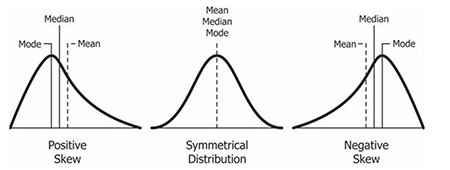
<h4 id="relationship-between-mean-and-median-under-different-skewness">Relationship between mean and median under different skewness</h4>
<p><img src="https://study.com/cimages/multimages/16/relationship_between_mean_and_median_under_different_skewness8100144901166854637.png" alt="Relationship between mean and median under different skewness" /></p>

<p>In a perfectly normal distribution, the mean, median, and mode are the same.</p>

<p><strong>Histogram 📊</strong>
It’s good to be able to use a histogram to check the distribution of the data, detect outliers and see if the data is skewed which can help with sampling/ partitioning decisions.</p>

<p><strong>Variance</strong>: Measure of how spread out a list of numbers is. Average of <strong>squared</strong> differences from mean. Not so easy to interpret—”On average, the squared difference from the mean is 2.67.”</p>

<p><strong>Standard Deviation</strong>: Measure of how spread out a list of numbers is. Square root of variance. Easier to interpret—”The values on average are 1.63 units away from the mean.” Useful for monitoring systems where values deviating from the average might signal a problem.</p>

<p><strong>Percentiles:</strong> The relative standing of a value within a dataset. For example, if you’re in the 90th percentile in a test, you scored higher than 90% of participants.</p>

<p><strong>Quartiles:</strong> Like percentiles but simplified to 4 parts where values may stand:</p>
<ul>
  <li>Q1 (25th percentile): 0% - 25%</li>
  <li>Q2 (50th percentile): 25% - 50%</li>
  <li>Q3 (75th percentile): 50% - 75%</li>
  <li>Q4 (100th percentile): 75% - 100%</li>
</ul>

<p>Useful when specifying SLAs or when we need a simplified distribution summary.</p>

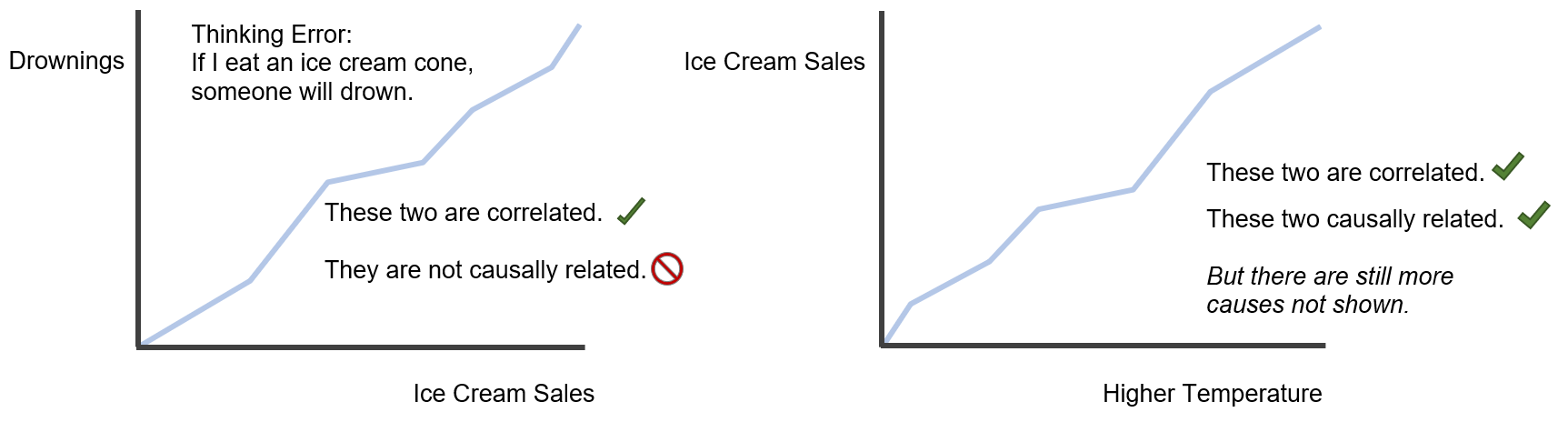
<p><strong>Correlation vs Causation 🔗🚫:</strong> Correlation measures the relationship between two variables. Causation takes place when one variable directly influences another. <strong>Correlation does not imply causation.</strong></p>

<p><em>Example:</em> Drowning deaths and ice cream sales are correlated. Every year, in the summer ice cream sales go up and so do drowning deaths. But this does not mean that ice cream sales cause drowning deaths.</p>

<h4 id="correlation-vs-causation">Correlation vs Causation</h4>
<p><img src="https://2164270.fs1.hubspotusercontent-na1.net/hubfs/2164270/image-png-Apr-23-2024-02-10-34-2327-PM.png" alt="Correlation vs Causation" /></p>

<p>In the next part I will go through:</p>
<ul>
  <li>🧪 A/B testing</li>
</ul>]]></content><author><name></name></author><category term="jekyll" /><category term="update" /><summary type="html"><![CDATA[Although data engineers mainly deal with setting up the data flow and underlying infrastructure, there are often cases where statistics comes useful: 🕵️‍♂️ Detecting data quality issues 📊 Understanding distributions of data 🚨 Monitoring processes and triggering alerts]]></summary></entry><entry><title type="html">3 core tools every data engineer should master (and why)</title><link href="http://10xdata.pro/jekyll/update/2025/06/18/fundamentals.html" rel="alternate" type="text/html" title="3 core tools every data engineer should master (and why)" /><published>2025-06-18T08:00:00+00:00</published><updated>2025-06-18T08:00:00+00:00</updated><id>http://10xdata.pro/jekyll/update/2025/06/18/fundamentals</id><content type="html" xml:base="http://10xdata.pro/jekyll/update/2025/06/18/fundamentals.html"><![CDATA[<p>Despite the growing number of tools and frameworks, the fundamentals of data engineering technologies are quite static.
Here are couple of areas that are worth focusing on from the start as they come up in almost all projects.</p>

<h1 id="-must-have">📌 Must have</h1>

<ol>
  <li>
    <p><strong>SQL</strong> - a language for interacting with databases. Must have for querying and manipulating data.<br />
Used in all modern data platforms.</p>

    <p>Useful commands:</p>
    <ul>
      <li><code class="language-plaintext highlighter-rouge">SELECT column_name FROM table_name</code> - simple query to get data from a table</li>
      <li><code class="language-plaintext highlighter-rouge">WHERE</code> - filter the data</li>
      <li><code class="language-plaintext highlighter-rouge">ORDER BY</code> - sort the data, to answer questions like “what is the most popular product?”</li>
      <li><code class="language-plaintext highlighter-rouge">GROUP BY</code> - group the data, ex. for calculating user monthly spend</li>
      <li><code class="language-plaintext highlighter-rouge">JOIN</code> - join together two tables by a common column</li>
      <li><code class="language-plaintext highlighter-rouge">WINDOW FUNCTIONS</code> - aggregations over subsets of rows, without changing the granularity of the data</li>
    </ul>

    <p>Knowing the above should cover 90% of SQL use cases.</p>
  </li>
  <li>
    <p><strong>Python</strong> - a general purpose programming language that excels in data.<br />
It simplifies the complexity and makes it easier to focus on the business logic.</p>

    <p>Opens the door to many applications, including big data and AI.<br />
It’s power is in a super wide range of open source libraries and frameworks.</p>

    <p>You can use it for anything data related: transforming data, visualising it, training machine learning models, bu not only. It can also be used in web development and automation so its definitely worth learning.</p>

    <p>libraries: 
pandas, matplotlib, sci-kit learn, etc.</p>
  </li>
  <li>
    <p><strong>Linux</strong> - an entry point into running scripts and automation.<br />
Has a very steep learning curve, knowing the basics will make you more productive.</p>

    <p>Useful commands:</p>
    <ul>
      <li><code class="language-plaintext highlighter-rouge">ls</code> - list files and directories</li>
      <li><code class="language-plaintext highlighter-rouge">cd</code> - change directory</li>
      <li><code class="language-plaintext highlighter-rouge">mkdir</code> - make directory</li>
      <li><code class="language-plaintext highlighter-rouge">rm</code> - remove file</li>
      <li><code class="language-plaintext highlighter-rouge">cp</code> - copy file</li>
      <li><code class="language-plaintext highlighter-rouge">mv</code> - move file</li>
      <li><code class="language-plaintext highlighter-rouge">cat</code> - print file content</li>
      <li><code class="language-plaintext highlighter-rouge">chmod</code> - change file permissions</li>
    </ul>
  </li>
</ol>

<hr />

<h1 id="-nice-to-have">✨ Nice to have</h1>

<ol>
  <li>
    <p><strong>git</strong> - a way to go for code versioning. Helps with staying sane over code changes and face the consequences of accidentally deleting your work. (we have all been there). Helps to keep track of changes introduced in our applications and make the quality of code easier to maintain through the process of Pull Requests.</p>
  </li>
  <li>
    <p><strong>Orchestration</strong> - a way to automate the execution of tasks and manage the dependencies between them.<br />
For simpler use cases you can use cron jobs that are built in linux tool for simple scheduling.<br />
For bigger workflows, requiring more complex dependencies, you will need something like Airflow or Dagster.<br />
Must have for any data platform.</p>
  </li>
  <li>
    <p><strong>Cloud</strong> - when you want to step away from your local laptop and have your data applications running live reliably, you need to deploy it on some kind of server. A natural choice is public cloud providers like AWS, GCP or Azure because buying and stacking hardware is not cool anymore.</p>

    <p>Not all data engineering roles interact with it directly, I found that operations heavy and data platform jobs tend to need it the most.</p>
  </li>
  <li>
    <p><strong>CI/CD &amp; infrastructure as code</strong> - a way to automate the deployment of your code. Be able to reliably tell that your code is working as expected before it goes live. These are <strong>MUST HAVE</strong> considerations for enterprise scale applications but if you are just getting started, I wouldn’t worry about them at the start.
<strong>This is rather a controversial take, but I have seen startup projects fail because they followed enterprise best practices too early before identifying the right problems to solve.</strong></p>
  </li>
</ol>

<p>examples:
Terraform, Github Actions</p>

<ol>
  <li>
    <p><strong>Big Data</strong> - Must have when data is too big to fit into memory of a single machine. Although it has a lot of use cases, a lot of companies don’t really need it due to the scale of their data.</p>

    <p>This is a broad topic so expect separate posts on this.
example: 
Apache Spark.</p>
  </li>
</ol>

<p>Is that all? No!
There are thousands of other frameworks and technologies that will come up in your projects! 
But mastering the fundamental tools that are not going anywhere soon seems the best time investment at the start. They keep coming up and not going anywhere.</p>

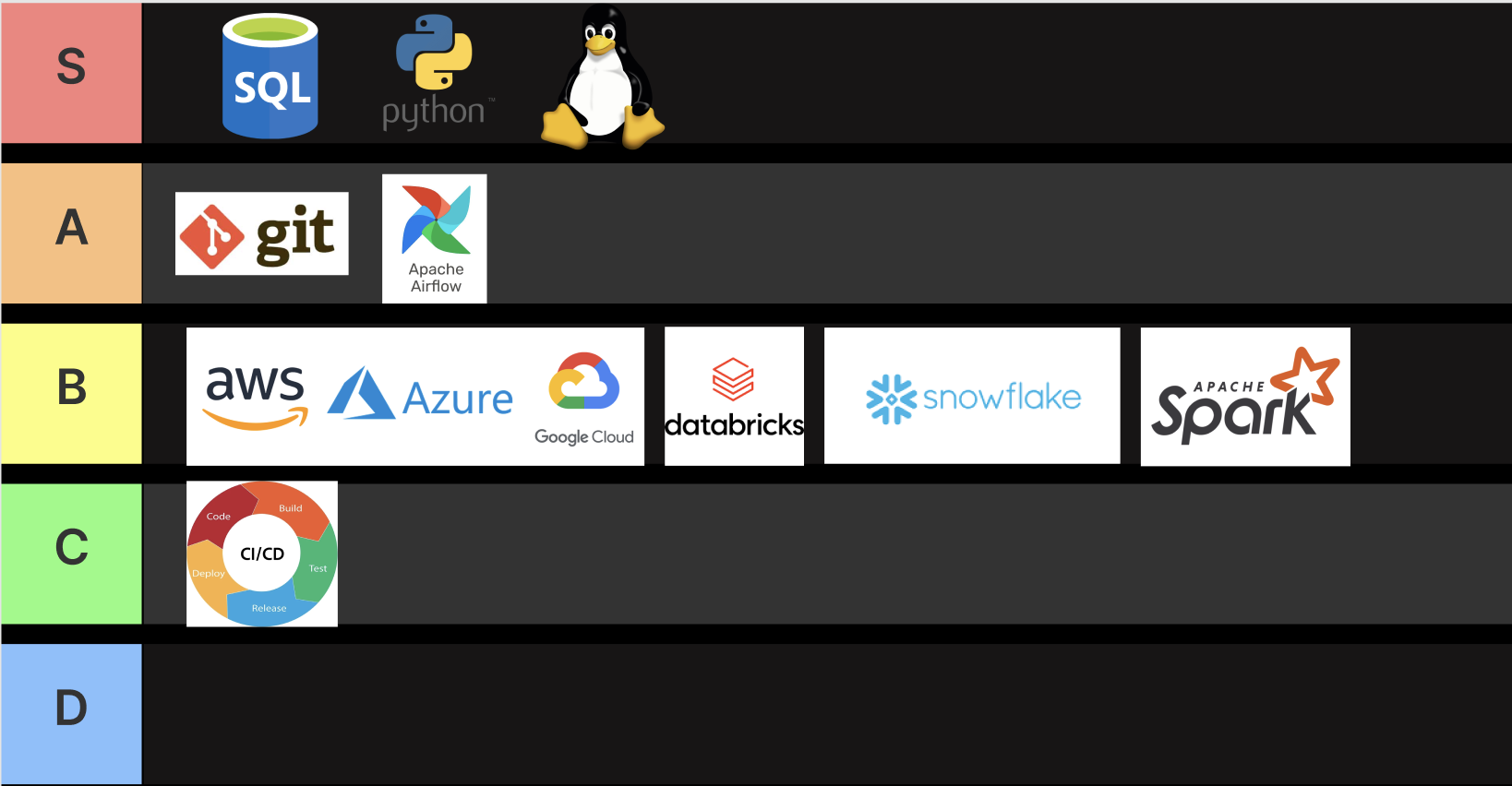
<p><strong>TLDR, this is how I would prioritise learning the tools if I started my journey again:</strong></p>

<p><img src="/assets\/images\/tiering.png" alt="Data Tiering" /></p>]]></content><author><name></name></author><category term="jekyll" /><category term="update" /><summary type="html"><![CDATA[Despite the growing number of tools and frameworks, the fundamentals of data engineering technologies are quite static. Here are couple of areas that are worth focusing on from the start as they come up in almost all projects.]]></summary></entry></feed>